
Why hide scores
From Germany, many games end in the middle of the night, and you watch them the next day. A score on a card would give the result away before you have seen a single play. The app can hide scores until you want to see them.
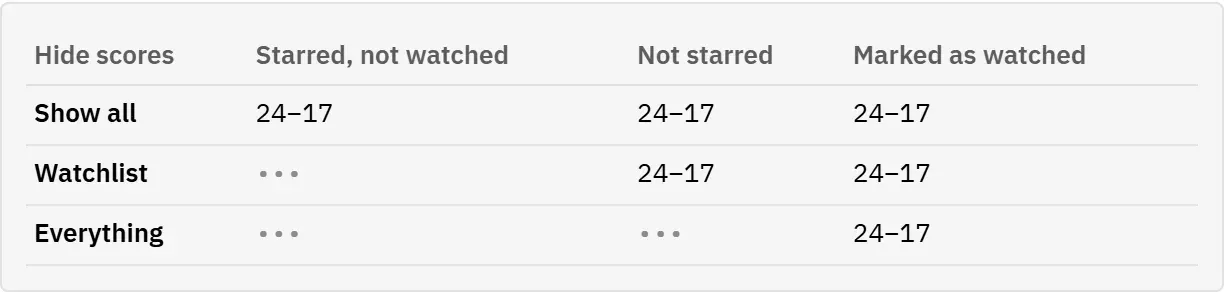
A hidden score appears as ••• in place of the numbers. This applies to games that are under way and to finished games, everywhere in the app: on the dashboard, the schedule, Live, the game page, My teams and the watchlist.
On game cards, the red mark that shows which team is leading is hidden as well, because it would give away just as much.
Figures that would give a hidden result away are covered too: on a team page, Record, Points per game and Allowed per game show ••• while any of the team’s results is hidden, and the dashboard’s Average margin leaves hidden results out.
When you start, nothing is hidden. Choose a setting as described in the next section.
Choose what to hide
You decide how much is hidden. The setting belongs to your account, so it applies on all your devices.
- Open Settings.
- Under Hide scores, choose one of three options:
- Show all: every score is visible. This is the setting when you start.
- Watchlist: hides the scores of the games you starred, the ones you mean to watch later. All other scores stay visible.
- Everything: hides every score, everywhere.
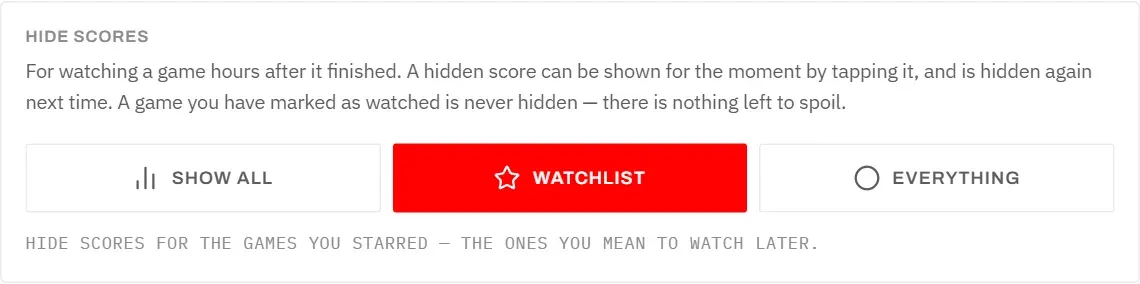
Watchlist suits most people: the games you plan to watch are exactly the ones a score would spoil, while the rest of the schedule stays easy to read.
The table shows which finished games keep their score hidden under each option.
Show a hidden score
Sometimes you want to know a result after all. You can show a single score without changing your setting.
- Tap the ••• (it is labelled Show the score).
- The score appears.
The score stays visible only while you stay on that screen. When you go to another screen and come back, it is hidden again. That way one quick look does not spoil the game for good.
To see a score permanently, mark the game as watched (next section) or change the setting.
Watched games
A game you have marked as watched never has its score hidden, whatever your setting. There is nothing left to spoil.
To mark a finished game as watched, tap the tick Mark as watched in its row on the watchlist, on its card, or on the game page. See Watchlist.
Good to know:
- Watched games are listed under Watched on your watchlist, with their scores shown.
- If you take the tick back, the score is hidden again according to your setting.
- If you remove a game from your watchlist, its watched mark goes too. Under Everything its score is then hidden again.