
Kickoff times
US schedules are published in US time. The Season Planner turns every kickoff into German time, so you can plan your evening, or your night, without doing sums.
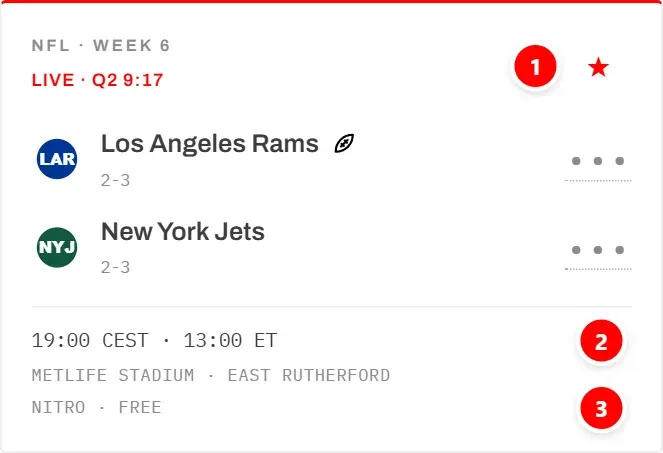
- 1 is the star that puts the game on your watchlist (see Watchlist).
- 2 is the kickoff line, explained below.
- 3 is the stream line: where you can watch the game (see the next section).
The kickoff line first gives the time in Germany, then the time on the US East Coast, for example:
19:00 CEST · 13:00 ET
- CEST is German summer time, CET German winter time. The app always uses the one that applies on the day of the game.
- ET is US Eastern time, the time US broadcasters quote.
- +1 after the German time means the game starts here on the day after its US date. A Sunday night game in the US, for example, shows as 02:20 CEST +1 · 20:20 ET: it starts in Germany early on Monday morning.
The US and Germany change between summer and winter time on different dates. The app takes care of that for every game.
Schedules and watchlists are grouped by German calendar day, so that night game appears under Monday.
When the time is not known yet, the line says so instead:
- Date set · kickoff time TBD: the day is fixed, the time is not (“to be decided”).
- Date not announced: not even the day is known yet.
The stream line
Every game card has a line that says where the game can be watched in Germany. The game details show the same answer under Stream.
ESPN publishes only the US broadcaster. The app works out the German answer from three sources: the German TV guide, the rights deals of the German broadcasters, and the US broadcaster of the game.
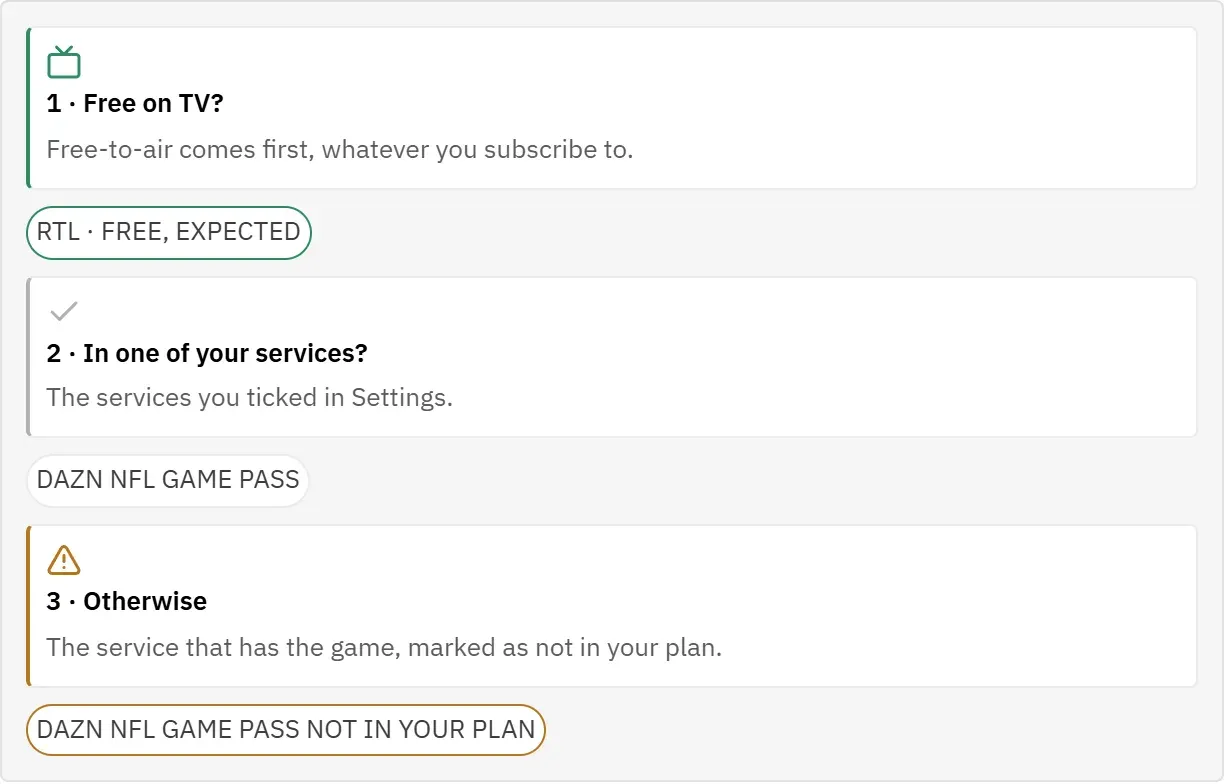
The app asks in this order:
- Is it on free TV? Then that is shown, whatever you subscribe to.
- Is it in one of your services? Those are the services you selected in Settings.
- Otherwise it names the service that has the game and marks it as not in your plan.
What the line can say:
| Stream line | What it means |
|---|---|
| RTL · FREE | Listed in the German TV guide on RTL. Free to watch. |
| NITRO · FREE | Listed in the German TV guide on NITRO. Free to watch. |
| RTL · FREE, EXPECTED | Not in the TV guide yet, but RTL holds the rights to games like this one. |
| DAZN NFL GAME PASS | In your Game Pass subscription. |
| DAZN NCAA | In your DAZN NCAA subscription. |
| DAZN NCAA, LIKELY | DAZN may show it and you subscribe; it is probable, not certain. |
| DAZN NFL GAME PASS NOT IN YOUR PLAN | Only on Game Pass, which you have not selected. |
| DAZN NCAA NOT IN YOUR PLAN | Only on DAZN NCAA, which you have not selected. |
| DAZN NCAA, LIKELY · NOT IN YOUR PLAN | DAZN probably shows it, but you have not selected DAZN NCAA. |
| BROADCAST NOT ANNOUNCED | No broadcaster has been named for this game yet. |
| FOX · NO GERMAN STREAM KNOWN | Shown in the US on the named channel; no way to watch it in Germany is known. |
Lines that mean you probably cannot watch the game, “not in your plan” and “no German stream known”, are highlighted.
NFL games
- A game listed in the German TV guide on RTL or NITRO shows as free.
- Games that start in the middle of the night in Germany are shown on RTL, so they show RTL · FREE, EXPECTED before the TV guide is published. The same goes for the Super Bowl.
- Every NFL game is on DAZN NFL Game Pass. So if it is not on free TV, the line names Game Pass.
- If the German TV guide lists a game on a paid service, RTL+ or Sky, the line asks for that same subscription, for example RTL+ NOT IN YOUR PLAN. At the moment the TV guide the app reads lists only RTL and NITRO, so this rarely happens.
College games
- DAZN shows every game with a team from the Big Ten, the Big 12 or the Mountain West, and the whole postseason. These show DAZN NCAA.
- From the SEC and the ACC, DAZN picks up to 25 games a week. Such a game is expected on DAZN if a US channel of the ESPN group shows it, or if no channel is known yet. It then shows DAZN NCAA, LIKELY if you subscribe, and DAZN NCAA, LIKELY · NOT IN YOUR PLAN if you do not.
- Other college games are only expected on DAZN if a US channel of the ESPN group shows them.
- College football has no free TV in this app.
Your streaming services
The stream line only becomes useful once the app knows what you pay for. Without that, every paid game reads as not in your plan.
- Open Settings.
- Under Streaming services, tap each service you subscribe to.
The change applies at once to every game card and to the game details. Select only what you actually have; otherwise a game shows as watchable when it is not for you.
In practice the two DAZN services decide most lines. RTL+ and Sky / WOW only matter when the TV guide lists a game on them, which is rare at the moment (see The stream line). More in Streaming services.
Night games
Many NFL games are played in the US evening, which is the middle of the night in Germany. The app marks them so you can plan ahead.
A game counts as a night game when it starts before 06:00 German time.
- In the lists on Dashboard and Watchlist, these games carry the note Late night.
- The figure Late-night kickoffs on the dashboard and the watchlist counts your starred games that start in the night.
- A game whose kickoff time is still TBD is never counted as a night game, even if it will probably be one.
- NFL night games are expected on free TV on RTL (see The stream line).
Night games and reminders: quiet hours are on by default from 01:00 to 07:00, and a reminder that falls into them is skipped. If you want to watch a night game live, choose Remind anyway on that game. See Remind anyway.
If you would rather sleep and watch the recording in the morning, hiding scores keeps the result from you until then. See Hiding scores.