
The team and following it
The team page shows one team: where it plays, how it stands, its game this week and its whole season schedule. From here you can also follow the team.
You open it by tapping a team name on a game page or in the standings.
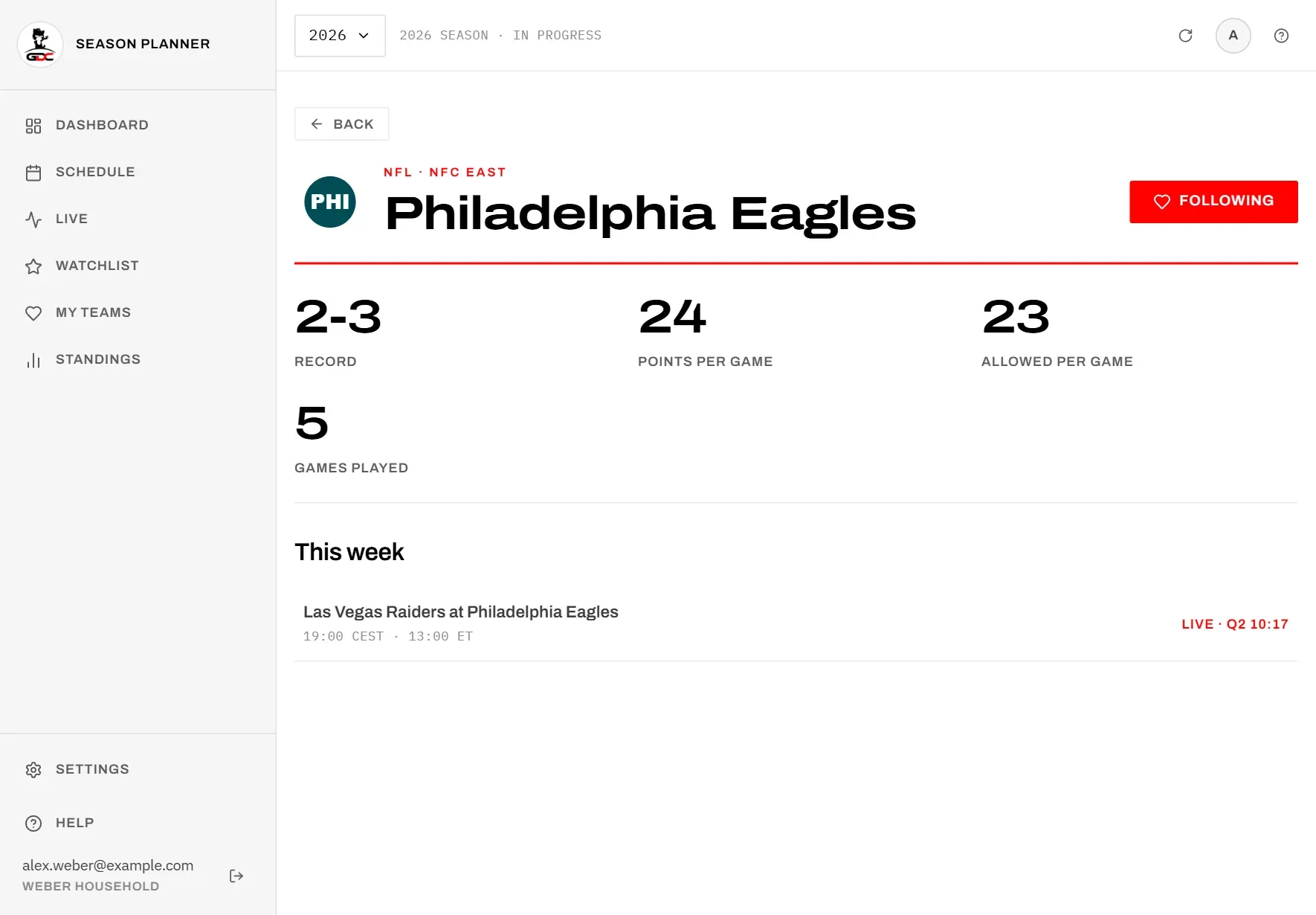
At the top you see:
- the team logo,
- the league and the team’s division or conference, for example “NFL · NFC East”,
- the team name,
- the button Follow, with a heart.
Tap Follow to follow the team. The button turns red and reads Following. Tap it again to stop following.
Following a team adds it to My teams and makes the filter My teams only available in the schedule. It is the same as the heart next to the team in the standings.
Use Back to return to where you came from.
The figures
The figures give a quick impression of the team’s season. They are counted from the team’s finished games of the selected season.
| Figure | What it means |
|---|---|
| Record | The team’s wins and losses so far, for example “2-3”, with ties as a third number if there are any. |
| Points per game | Average points the team scored in its finished games, rounded. |
| Allowed per game | Average points the team conceded in those same games, rounded. |
| Games played | How many games the team has finished this season. |
A game that is still being played does not count until it is final. ”—” means the team has not finished a game yet.
The figures follow your score setting. While any of the team’s results is hidden, Record, Points per game and Allowed per game show ”•••”, because they would give that result away. Tap ”•••” to show them; they stay visible until you leave the screen. Games played is always shown.
This week
This week shows the team’s game in the week the season is in right now.
Each row shows:
- the two teams as “away at home”,
- the kickoff in Berlin time and US Eastern time, or Kickoff time TBD,
- on the right, the state of the game: “Scheduled” with the US TV network, “Live” with quarter and clock, Final, or Kickoff time TBD.
Tap the row to open the game page. There you can star the game.
If the team has no game this week, you see No game this week: either it is a bye week, or the games have not been published yet. The team’s other games are in the season schedule below.
Season schedule
Season schedule lists every game the team plays in the selected season, from the first to the last, including the postseason once it is known.
Each row shows:
- the two teams as “away at home”,
- the week, for example “Week 5” or “Wild Card”, and the day in Berlin,
- for a game still to come, the kickoff in Berlin time and US Eastern time, or Kickoff time TBD,
- on the right, the score of a finished game, or the state of a game still to come or being played, as in This week.
Scores follow your score setting: a hidden score shows ”•••”. Tap it to show that one score.
In the playoffs the list itself could give a result away: a game in the next round means the team won. So while the score of a finished playoff game is hidden, the playoff games after it are left out, also under This week. In their place you see Later playoff games hidden, without saying how many. Tap ”•••” there (the button is called Show the playoff result) to show that score and the next round. Each round is shown on its own, so you can follow the playoffs one game at a time.
Tap a row to open the game page.