
From the plan
The budget shows what the trip costs and how much of it you have already paid. Most of it fills itself: every price you enter on a stop appears here, so nothing has to be typed twice.
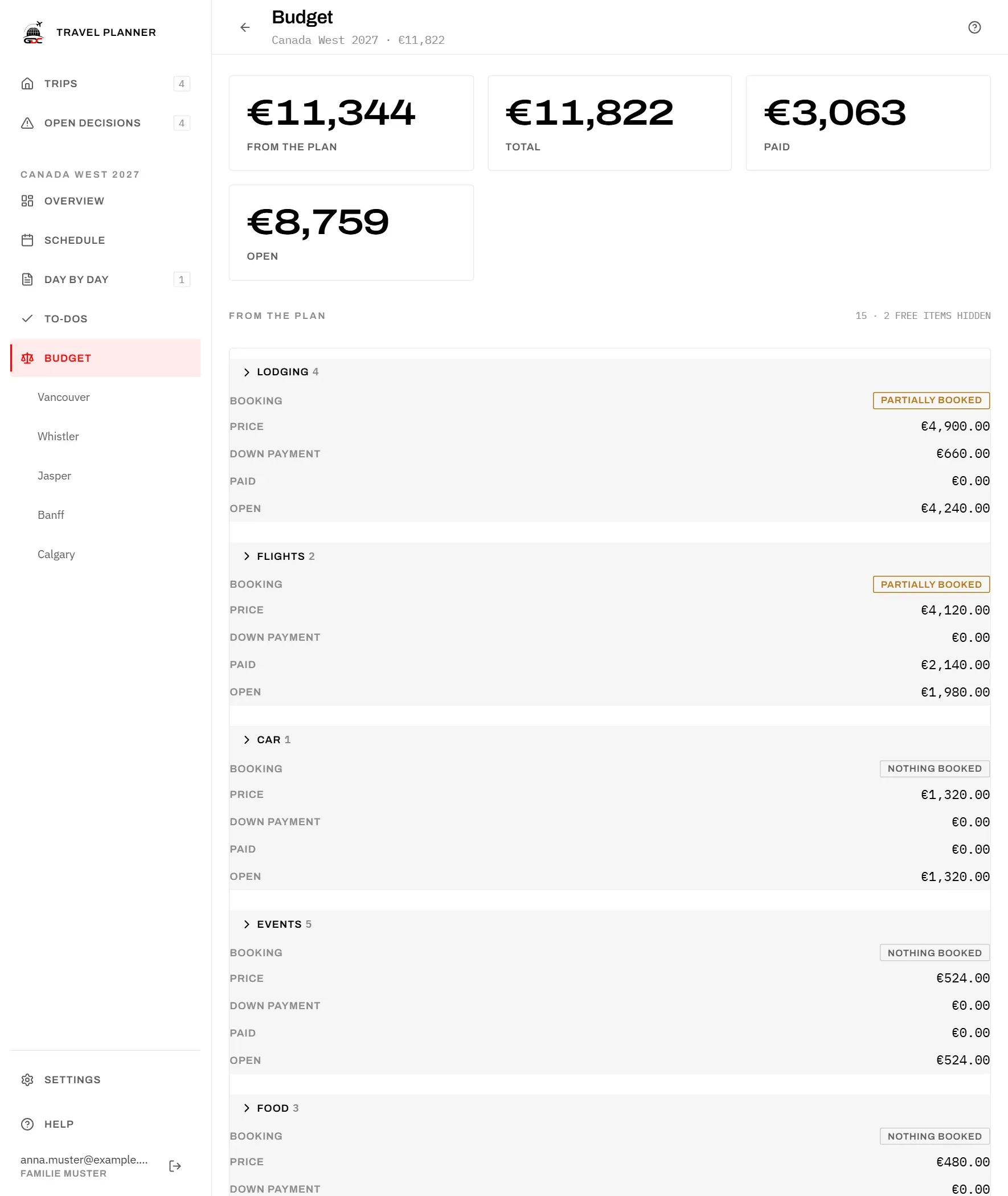
The four figures at the top:
- From the plan: everything the plan costs.
- Total: the plan plus your other costs.
- Paid: everything you have recorded as paid, deposits included.
- Open: the total minus what has been paid.
What counts
Under From the plan you find:
- at each stop, the chosen flight or journey, the chosen accommodation and the chosen rental car: the booked one, or if none is booked, the favourite;
- every event and every meal.
Alternatives you did not choose are not counted, and neither are archived options. A rental car that you keep across several stops is counted once, at the stop where you rent it.
The lines are grouped into Lodging, Flights, Car, Events and Food. Each group starts closed and shows its number of lines, whether everything in it is booked (All booked, Partially booked or Nothing booked) and its sums. Tap a group to see its lines; each line shows the stop it belongs to and whether it is Booked. Planned total adds up all groups.
Lines that cost nothing, such as a free walk, are hidden so that they do not crowd out the ones that matter. The heading says how many are hidden (“2 free items hidden”). As soon as you record a payment on one, it shows again.
Changing a price
You cannot change a price here. Each price lives on its stop, and the budget only reads it. That way the plan and the budget can never disagree.
To change a price, tap the line’s name (Open the stop). The stop opens, where you change the option; the budget follows straight away.
Recording payments
What the plan cannot know is what you have already paid. You record that here, on every line, from the plan and among the other costs alike.
- Tap into the Down payment or Paid field of a line.
- Type the amount.
- Press Enter or tap elsewhere. The amount is saved.
Press Escape before leaving the field to keep the previous amount.
The two fields add up. Put the deposit under Down payment and whatever you pay after it under Paid; Open is the price minus both. A hotel with a 400 deposit and nothing else paid yet is 400 under Down payment and nothing under Paid. When you pay the rest, enter only the rest under Paid, not the deposit again.
The Open column shows how far a line has got:
- just the amount: nothing paid yet;
- the amount and Part paid: something has been paid, but not all;
- Paid: the full price has been paid.
Other costs
Not every cost belongs to an option on a stop: a SIM card, spending money, the cat sitter. Add these under Other costs, so that the budget shows the whole trip.
- Tap Add item.
- Enter an Item (its name) and the Price.
- Tap Save.
Record what you have paid on these lines just like on the others (see above). Use Edit (the pencil) to change the name or price, and Delete (the bin) to remove the line; you can take it back with Undo for a few seconds.
Below the table, Plan and extras shows the total of both sections. It is the same amount as Total at the top of the page.