
Why an elimination diet
A cat that vomits often, or has an inflamed stomach or gut, may not tolerate one of its foods. Cats usually react to the protein in a food: chicken, beef, salmon. The usual test is an elimination diet: for six to eight weeks the cat gets only one protein, or only a few. If the vomiting stops, those foods are tolerated. If it goes on, they are suspects.
Cat’s Health helps with each step:
- It shows which proteins came before vomiting more often than others, as a starting point.
- It keeps a pool of the foods allowed in the current period.
- It stops the scanner from giving the cat anything outside that pool.
- It keeps a status for every food and cat: unclear, suspected, cleared or intolerant.
The diet is not always on. It only starts when you start it, and it only restricts the cat you start it for. The other cats keep eating as usual.
Talk to your vet before and during the diet. The app’s hints come from your own records and are no diagnosis.
Tag foods with their proteins
Grouping by protein only works once your foods say what is in them. Open a food in the Food database and tap every protein under Protein sources. A food can have several: a “beef with chicken” can counts as beef and chicken.
The list of proteins is in Settings in the feeding group, under Protein sources. Add one there if a food contains something that is missing, such as ostrich. In the food database, the filter No protein set shows the foods that still need tagging.
If you allow it, an AI assistant can fill in missing protein sources for you (see AI assistants).
Starting a diet
Open Elimination diet in the menu, below Feeding log, and tap Start elimination diet for the cat — or do the same from the Elimination diet box on the cat’s profile. While diets are running, the menu entry shows how many.
Then choose:
- Mono protein: one protein for the whole period. This gives the clearest result.
- Reduced proteins: two or three proteins tested together. Use this for a cat that refuses the same food too often.
- Duration: six to eight weeks is usual.
What the records suggest
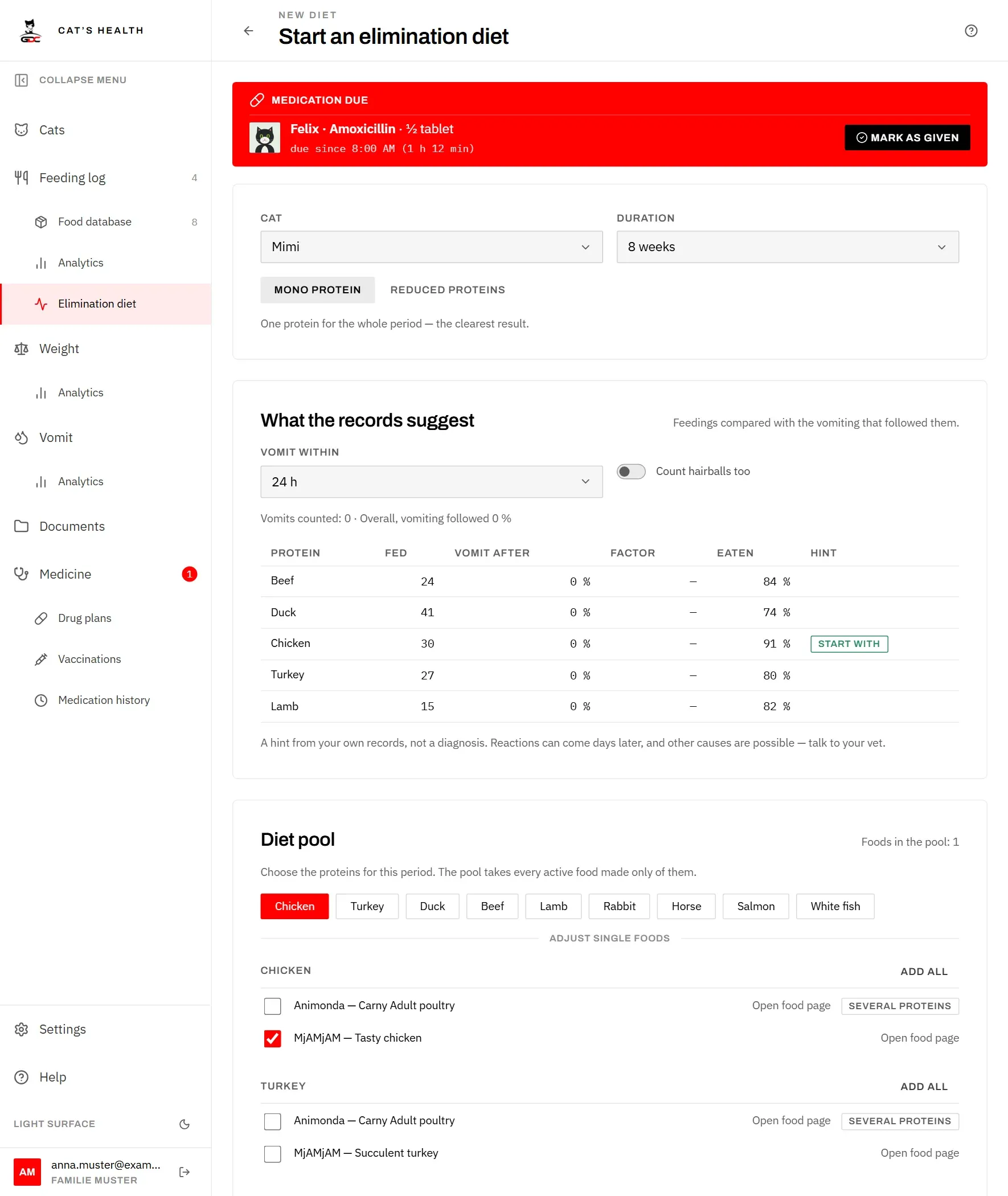
Below that, the app compares the cat’s feedings with the vomiting that followed:
- A feeding counts if the cat was given the food. A rejected meal does not count, because the cat most likely did not eat it.
- A vomit counts against the foods fed in the hours before it (Vomit within: 12, 24 or 48 hours). Without clock times the app goes by days: the next day counts in full, the same day counts half, because the vomit may have come before the meal.
- Hairballs are left out unless you switch on Count hairballs too.
For each protein the table shows how often it was fed, how often vomiting followed (Vomit after), the Factor against the cat’s usual rate, and how well it was eaten. A factor of 1 is ordinary. From about 1.5, with enough feedings, the protein is marked Leave out. The best-tolerated proteins that the cat also eats well are marked Start with. With fewer than five feedings a protein says Too little data.
Under Foods to leave out, tap Mark as suspected to keep such a food’s status. The status then says it came from the app’s analysis.
The diet pool
The pool is the list of foods the cat may get in this period. Tap the proteins to use. The pool then takes every active food made only of those proteins, so a “beef with chicken” can stays out of a beef diet. Foods marked as suspected or intolerant for this cat are left out too.
Below Adjust single foods you can add or remove single foods, or a whole protein at once. Foods with several proteins, archived foods and foods with a status are marked. Tap Start elimination diet when the pool is right.
Feeding during the diet
While a cat is on a diet, the top of the Feeding log says so: the cat, the day of the diet and the current period, and which foods the pool allows. Tap it to open the diet.
When you scan a food that is not in the pool, the diet cat cannot be picked on the match card. Its button is greyed out, and a line below says why. The other cats can still get the can. If the diet cat is the only one, the food cannot be logged at all.
The server applies the same rule, so no other device or app can log such a feeding either. Logging an older meal from before the diet still works.
A food marked as intolerant for a cat shows a warning when you scan it, even without a running diet.
Periods and ending
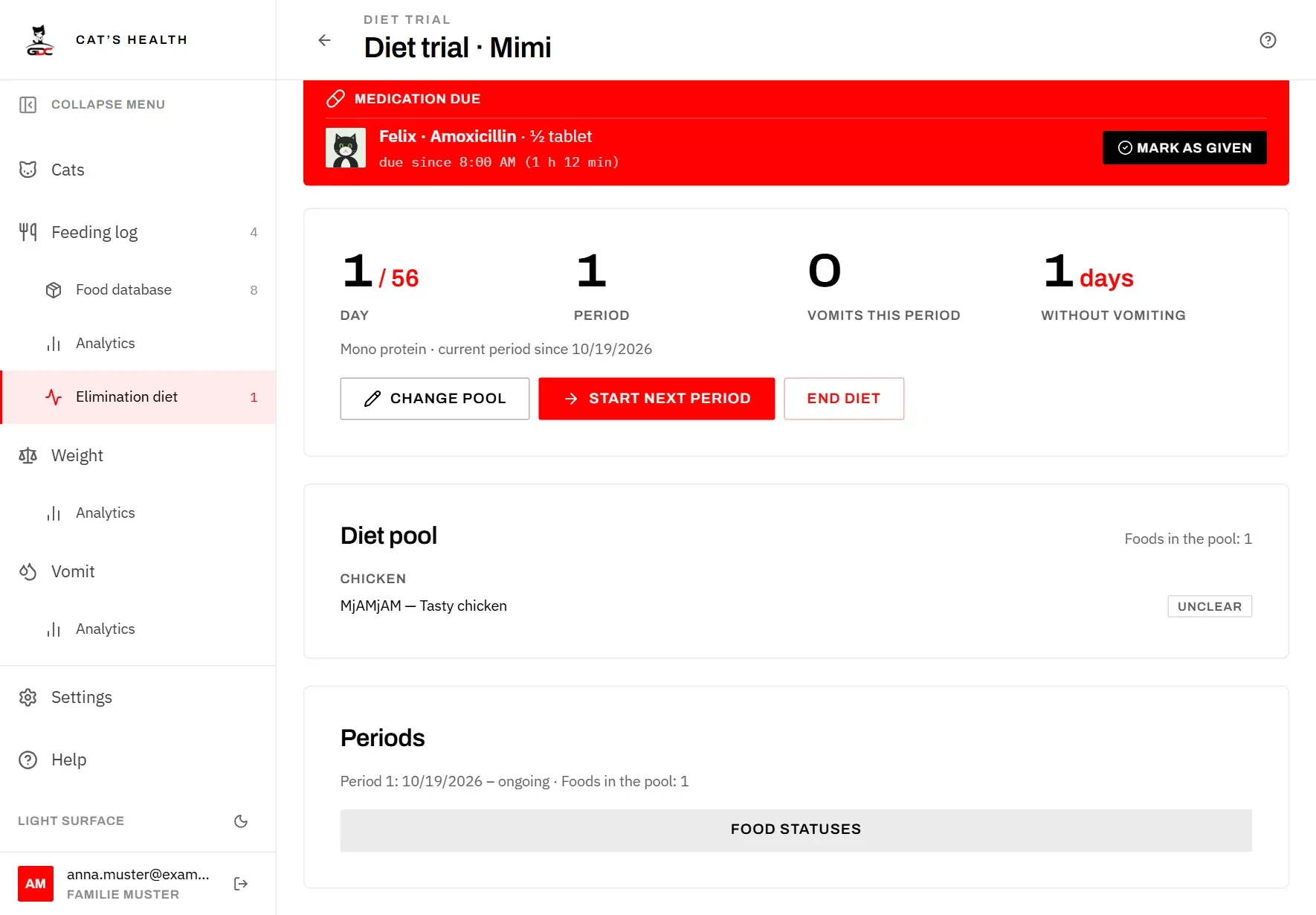
The diet page shows the day of the diet, the current period, the vomits in this period and the days without vomiting.
- Change pool adds or removes foods in the current period, for example when the cat needs a second flavour.
- Start next period closes the current period and starts a new one with a new pool, for example to add the next protein. Earlier periods stay listed, so you can see later what was fed when.
- After two weeks without vomiting the page offers Mark pool foods as cleared. After vomiting it offers to mark them as Suspected or Intolerant. Nothing changes until you confirm.
- End diet ends the restriction. The statuses stay.
Food statuses
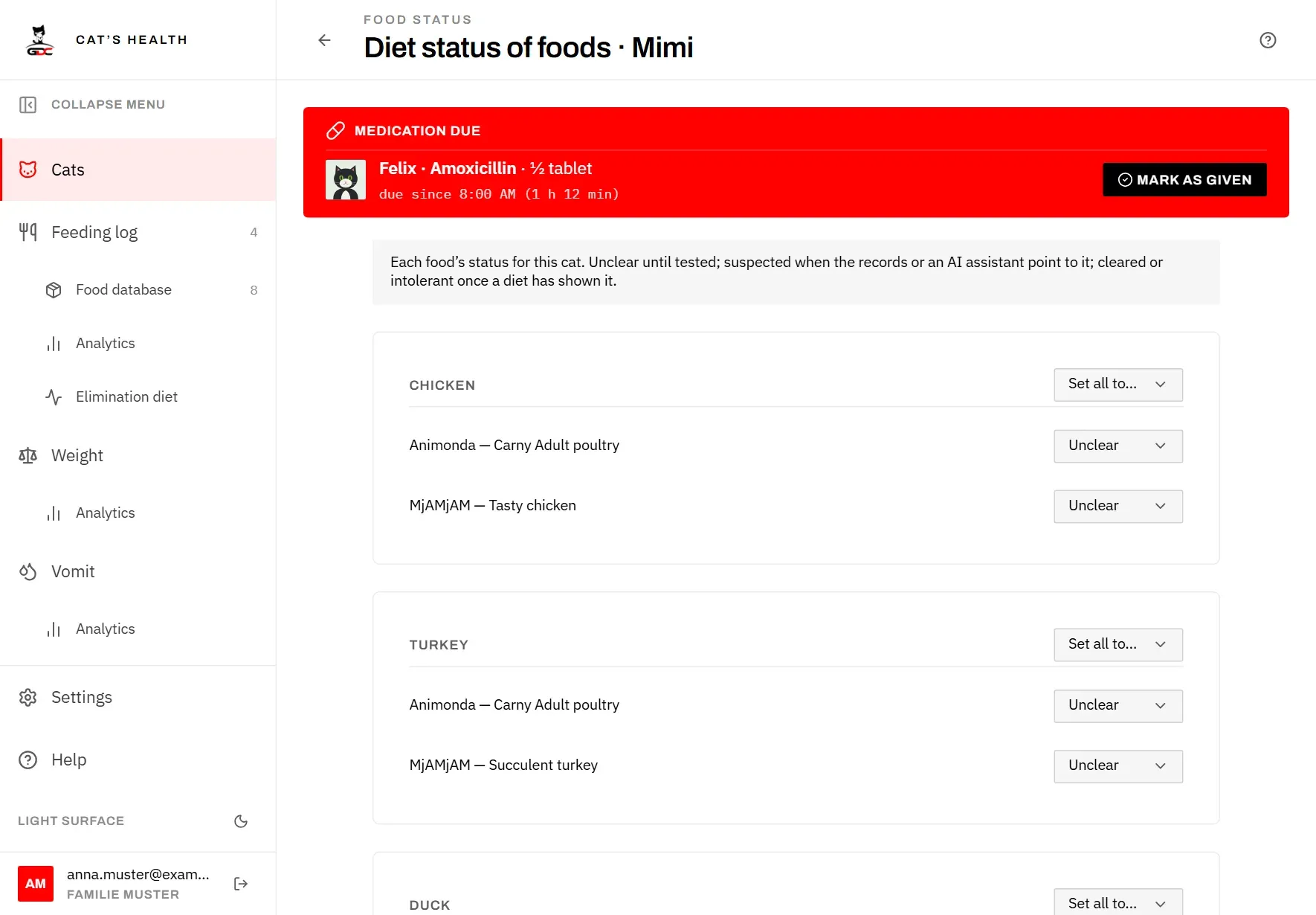
Each food has a status for each cat:
- Unclear: not tested yet. Every food starts here.
- Suspected: the records or an AI assistant point to it, or you suspect it yourself.
- Cleared: a diet period with this food went without vomiting.
- Intolerant: a diet showed that this food leads to vomiting.
Food statuses, on the cat’s profile or the diet page, lists every food grouped by protein. Change a single food, or use Set all to… for a whole protein. Below a food you see who set its status (by hand, from the app’s analysis, or by an AI assistant), when, and why.
AI assistants
A connected AI assistant (see AI assistants) can read the diets and statuses and compare feedings with vomiting itself. If you also switch on Also allow assistants to flag foods for the elimination diet in Settings, it may:
- mark a food as suspected for a cat, always with a reason you can read;
- take back a suspicion it or someone else raised;
- fill in protein sources for foods that have none yet.
An assistant can never mark a food as cleared or intolerant, change a status you set to one of those, or change protein sources you already chose.