
The timeline
Is a cat vomiting more often than usual? Analytics below Vomit in the menu answers that at a glance, with three key figures and a timeline of the last 90 days.
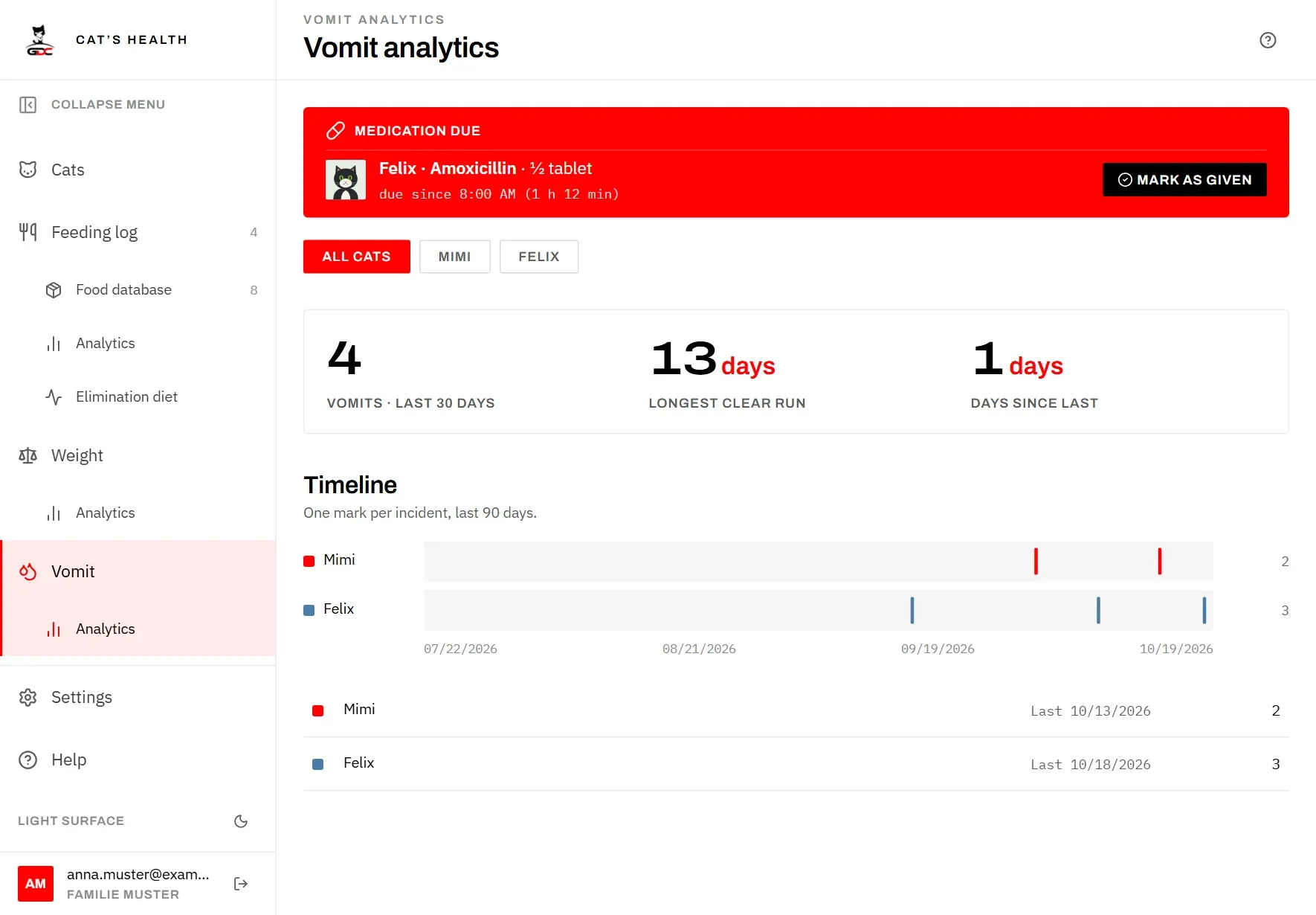
At the top, choose which cats to look at:
- All cats covers the whole household.
- Tap a cat’s name to look at that cat only. Cats that have died are not offered here, as on the other screens; their history stays in the view of all cats.
The three key figures count only the cats you selected:
- Vomits · last 30 days: how many incidents there were in the last 30 days, today included.
- Longest clear run: the longest stretch of days without any incident. The days since the last incident count as a stretch too, so a good spell that is still going shows here.
- Days since last: how many days have passed since the most recent incident.
A dash means there is no incident to count yet.
The Timeline has one lane per cat, in the cat’s colour. Each mark is one incident; the left edge is 90 days ago and the right edge is today. The dates below the lanes help you place the marks. The number at the end of a lane is how many incidents that cat had in these 90 days. Marks that bunch together show at once when a cat had a bad few weeks.
Below the timeline, each cat’s row repeats that number and shows Last with the date of its most recent incident, even if that was longer than 90 days ago. A dash means it has never vomited.
If nothing has been recorded yet, the page shows No incidents recorded yet. Incidents are entered on the Vomit page (see Log an incident).