
Plans
A drug plan tells the app which medication a cat gets, how much and when. From the plan the app works out every dose, shows it in the calendar and reminds the whole household when one is due.
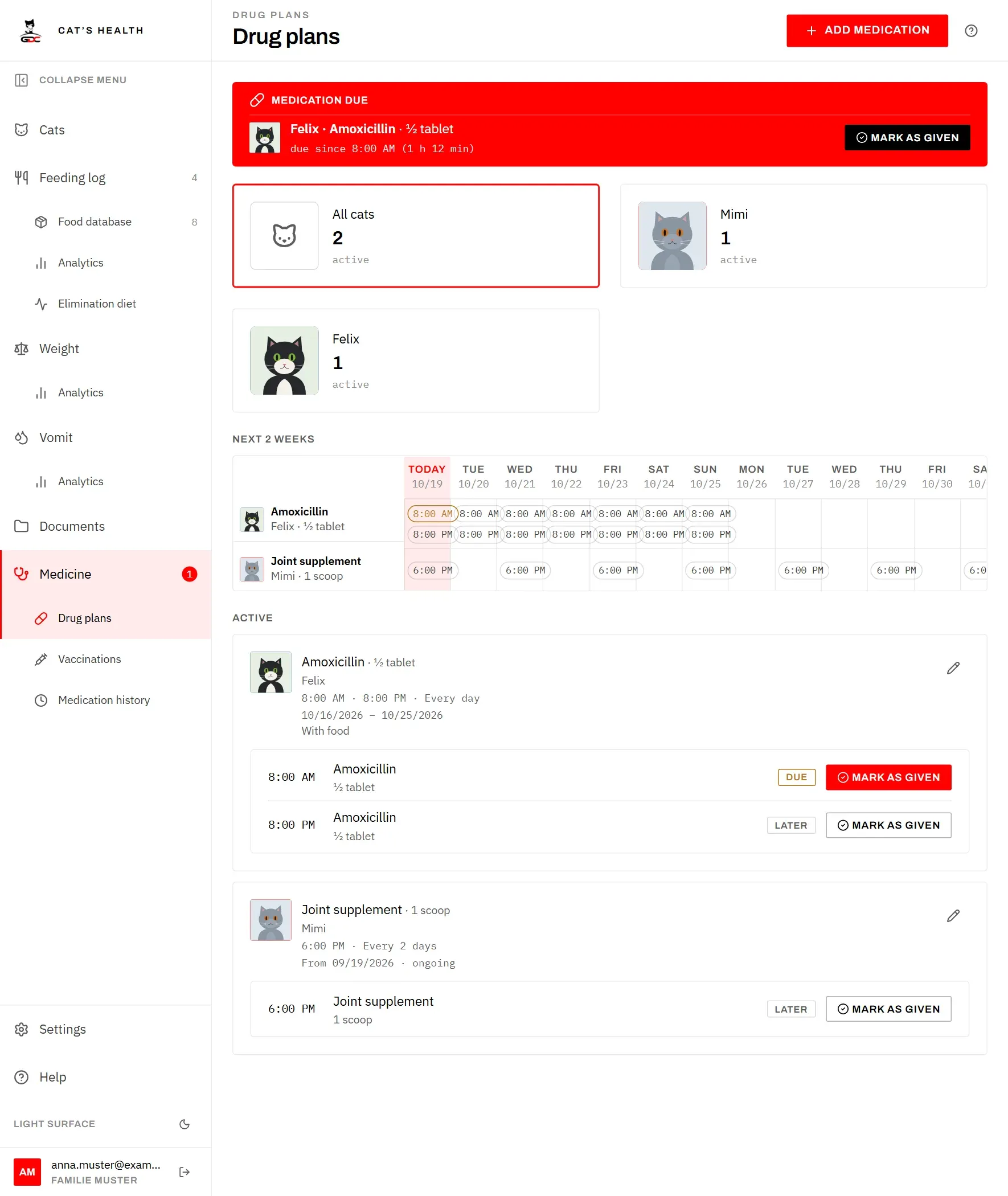
This is how a plan works from start to finish:

The plans are grouped into Active (running today), Starting later and Ended. The cat cards at the top filter the screen to one cat and show how many plans are active for each cat. Tap the same card again, or All cats, to see all plans.
Add a plan
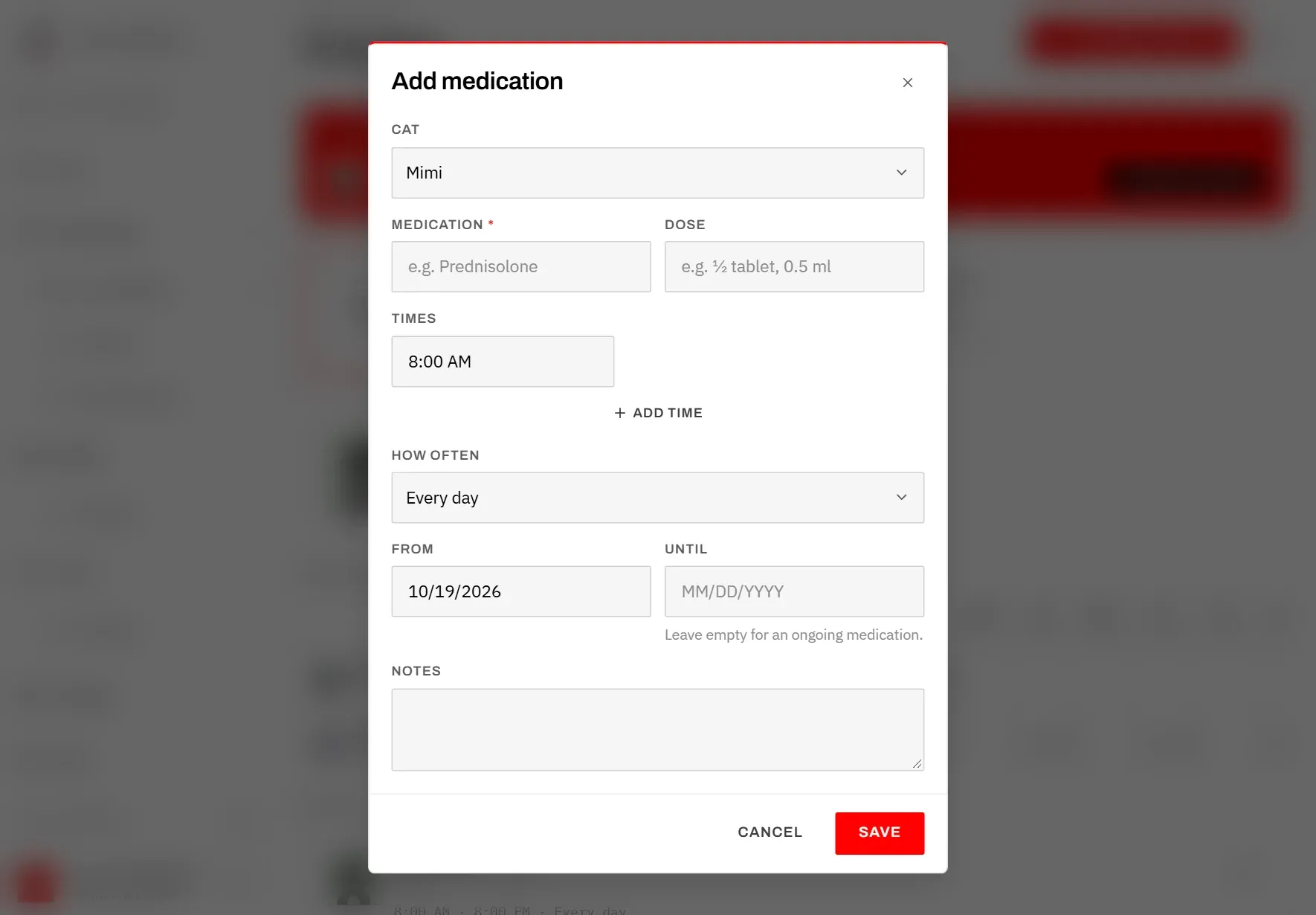
- Tap Add medication at the top of the screen.
- Choose the Cat. If the screen is filtered to one cat, that cat is already selected.
- Enter the Medication, for example “Amoxicillin”. This is required.
- Enter the Dose if you like, for example “½ tablet” or “0.5 ml”. It is shown next to the name everywhere, so whoever gives the dose knows how much.
- Set the Times of day. There is one time to start with (8:00). Tap Add time for a second dose, for example in the evening. Tap the x next to a time to remove it. Up to eight times are possible.
- Under How often, choose Every day or every 2, 3, 7, 14 or 30 days. The rhythm counts from the start date: “every 2 days” starting on Monday means Monday, Wednesday, Friday and so on.
- Set From (the first day). Set Until for a course with an end, such as ten days of antibiotics; the last day is included. Leave Until empty for a medication the cat takes for good.
- Add Notes if they help, for example “With food”. They are shown on the plan’s card.
- Tap Save.
You can only add plans for cats that are alive.
Change or delete a plan
Tap the pencil on a plan’s card, change what you need and tap Save. A change applies to the doses from then on; doses already given stay as they were recorded.
To delete a plan, open it with the pencil, tap the trash can and confirm. The doses already given stay in the Medication history, still under the plan’s name. When a course is simply finished, you don’t need to delete it: set Until and it moves to Ended by itself.
The two-week calendar
The calendar under Next 2 weeks shows when each medication is due, from today two weeks ahead. It follows the cat filter, so you can look at one cat’s plans on their own.
On an iPad or computer it is a grid: one row per medication, one column per day, and in each cell the times of that day’s doses. Today’s column is highlighted. On a phone, where fourteen columns don’t fit, it is a list instead, day by day, showing only days that have doses.
For today, the times also show their state:
- a time with a tick has been given,
- a highlighted time is due and not given yet,
- a plain time is still to come.
The calendar is for looking ahead. You tick doses off on the plan cards, on the Medicine screen or in the red banner.
Tick off a dose
Ticking off a dose records that it was given, and when. This is how everyone in the household knows the cat has had its medication, and nobody gives it twice.
Every active plan’s card lists today’s doses. Each dose is marked Due once its time has come, or Later before that.
- Give the medication.
- Tap Mark as given next to the dose. The app records the current time as the time it was given.
- The row now shows “given” and the time. The dose is in the Medication history.
Tapped the wrong dose? Tap Undo in the same row and the dose counts as not given again.
You can tick off a dose before its time, too, for example when you give the evening dose a little early.
If you only get round to tapping later, the recorded time is the time of the tap, not when the cat really got the medication. You can correct it afterwards in the Medication history.
The due-dose banner
As soon as a dose’s time has come and it has not been ticked off, a red Medication due banner appears at the top of every screen, on every device in the household. It names the cat, the medication and the dose, and says how long it has been due (“due since 8:00 AM (1 h 12 min)”).
The banner can’t be closed. It goes away only when someone taps Mark as given, in the banner itself or anywhere else. That way whoever picks up the iPad or phone next sees that a cat is waiting. A dose given on another device clears the banner within about a minute.
The banner shows today’s doses only. A dose missed yesterday is not carried over; if a dose was missed, ask your vet what to do. See also The banner.